Volatility advanced
In this practice, you will learn how to use the basic functionalities of Volatility to analyze memory dumps. Volatility is a powerful memory analysis tool that allows the identification of processes, network connections, Windows registry information, open files, and more. During this activity, you will work with a real memory dump and will be required to use various plugins and command modifiers to solve the 16 questions posed.
The required steps are described below:
Determine the operating system profile corresponding to the memory dump.
Use the appropriate plugins to extract the requested information.
Apply command modifiers to filter and organize the results.
By the end of the practice, you should be able to identify active processes, registry keys, network connections, and other relevant artifacts.
Requirements
Make sure you have Volatility 2.x or Volatility 3 installed.
Download the memory dump assigned for this practice.
Document the commands used to answer each of the questions.
Submit a detailed report containing the answers to the 16 questions, accompanied by screenshots of the commands executed and the results obtained.
Questions
Operating System Profile
Use the memory dump to identify the operating system profile compatible with this dump.
vol -f dump.raw -r csv windows.info
TreeDepth |
Variable |
Value PDB scanning finished |
|---|---|---|
0 |
Kernel Base |
0xf80002a0d000 |
0 |
DTB |
0x187000 |
0 |
Symbols |
file:///home/kali/tools/volatility3/volatility3/symbols/windows/ntkrnlmp.pdb/3844DBB920174967BE7AA4A2C20430FA-2.json.xz |
0 |
Is64Bit |
True |
0 |
IsPAE |
False |
0 |
layer_name |
0 WindowsIntel32e |
0 |
memory_layer |
1 FileLayer |
0 |
KdDebuggerDataBlock |
0xf80002bfe0a0 |
0 |
NTBuildLab |
7601.17514.amd64fre.win7sp1_rtm. |
0 |
CSDVersion |
1 |
0 |
KdVersionBlock |
0xf80002bfe068 |
0 |
Major/Minor |
15.7601 |
0 |
MachineType |
34404 |
0 |
KeNumberProcessors |
8 |
0 |
SystemTime |
2020-06-12 16:19:04+00:00 |
0 |
NtSystemRoot |
C:\Windows |
0 |
NtProductType |
NtProductWinNt |
0 |
NtMajorVersion |
6 |
0 |
NtMinorVersion |
1 |
0 |
PE MajorOperatingSystemVersion |
6 |
0 |
PE MinorOperatingSystemVersion |
1 |
0 |
PE Machine |
34404 |
0 |
PE TimeDateStamp |
Sat Nov 20 09:30:02 2010 |
Running Processes
How many processes were active on the system at the time the memory capture was taken?
vol -f dump.raw -r csv windows.pslist
TreeDepth |
PID |
PPID |
ImageFileName |
Offset(V) |
Threads |
Handles |
SessionId |
Wow64 |
CreateTime |
ExitTime |
File output |
|---|---|---|---|---|---|---|---|---|---|---|---|
0 |
4 |
0 |
System |
0xfa8018d469e0 |
115 |
484 |
N/A |
False |
2020-06-12 16:15:10.000000 UTC |
N/A |
Disabled |
0 |
292 |
4 |
smss.exe |
0xfa8019e67530 |
2 |
36 |
N/A |
False |
2020-06-12 16:15:10.000000 UTC |
N/A |
Disabled |
0 |
372 |
352 |
csrss.exe |
0xfa8019dd3060 |
10 |
354 |
0 |
False |
2020-06-12 16:15:11.000000 UTC |
N/A |
Disabled |
0 |
412 |
352 |
wininit.exe |
0xfa8018db4060 |
3 |
83 |
0 |
False |
2020-06-12 16:15:11.000000 UTC |
N/A |
Disabled |
0 |
432 |
420 |
csrss.exe |
0xfa8019e489e0 |
10 |
492 |
1 |
False |
2020-06-12 16:15:11.000000 UTC |
N/A |
Disabled |
0 |
468 |
420 |
winlogon.exe |
0xfa801a605910 |
6 |
122 |
1 |
False |
2020-06-12 16:15:12.000000 UTC |
N/A |
Disabled |
0 |
512 |
412 |
services.exe |
0xfa801a6f2060 |
8 |
209 |
0 |
False |
2020-06-12 16:15:12.000000 UTC |
N/A |
Disabled |
0 |
528 |
412 |
lsass.exe |
0xfa8019db3b30 |
9 |
633 |
0 |
False |
2020-06-12 16:15:12.000000 UTC |
N/A |
Disabled |
0 |
536 |
412 |
lsm.exe |
0xfa801a6feb30 |
10 |
148 |
0 |
False |
2020-06-12 16:15:12.000000 UTC |
N/A |
Disabled |
0 |
648 |
512 |
svchost.exe |
0xfa801a7c65f0 |
11 |
379 |
0 |
False |
2020-06-12 16:15:12.000000 UTC |
N/A |
Disabled |
0 |
728 |
512 |
svchost.exe |
0xfa801a7e1060 |
7 |
286 |
0 |
False |
2020-06-12 16:15:12.000000 UTC |
N/A |
Disabled |
0 |
804 |
512 |
svchost.exe |
0xfa801a820730 |
21 |
489 |
0 |
False |
2020-06-12 16:15:12.000000 UTC |
N/A |
Disabled |
0 |
852 |
512 |
svchost.exe |
0xfa801a850730 |
20 |
420 |
0 |
False |
2020-06-12 16:15:12.000000 UTC |
N/A |
Disabled |
0 |
888 |
512 |
svchost.exe |
0xfa801a863630 |
39 |
980 |
0 |
False |
2020-06-12 16:15:12.000000 UTC |
N/A |
Disabled |
0 |
968 |
804 |
audiodg.exe |
0xfa801a89b620 |
7 |
135 |
0 |
False |
2020-06-12 16:15:12.000000 UTC |
N/A |
Disabled |
0 |
148 |
512 |
svchost.exe |
0xfa801a8db5f0 |
11 |
282 |
0 |
False |
2020-06-12 16:15:12.000000 UTC |
N/A |
Disabled |
0 |
604 |
512 |
svchost.exe |
0xfa801a913b30 |
19 |
505 |
0 |
False |
2020-06-12 16:15:12.000000 UTC |
N/A |
Disabled |
0 |
1164 |
512 |
spoolsv.exe |
0xfa801a9be780 |
13 |
305 |
0 |
False |
2020-06-12 16:15:12.000000 UTC |
N/A |
Disabled |
0 |
1200 |
512 |
svchost.exe |
0xfa801a9e1060 |
19 |
342 |
0 |
False |
2020-06-12 16:15:12.000000 UTC |
N/A |
Disabled |
0 |
1872 |
852 |
dwm.exe |
0xfa801abc0190 |
4 |
79 |
1 |
False |
2020-06-12 16:15:16.000000 UTC |
N/A |
Disabled |
0 |
1928 |
1864 |
explorer.exe |
0xfa801abd46b0 |
29 |
839 |
1 |
False |
2020-06-12 16:15:16.000000 UTC |
N/A |
Disabled |
0 |
1980 |
512 |
taskhost.exe |
0xfa801abfcb30 |
10 |
173 |
1 |
False |
2020-06-12 16:15:16.000000 UTC |
N/A |
Disabled |
0 |
1036 |
512 |
SearchIndexer. |
0xfa801ac7a060 |
17 |
703 |
0 |
False |
2020-06-12 16:15:23.000000 UTC |
N/A |
Disabled |
0 |
1032 |
1928 |
iexplore.exe |
0xfa801aca3b30 |
15 |
595 |
1 |
True |
2020-06-12 16:15:29.000000 UTC |
N/A |
Disabled |
0 |
816 |
1032 |
iexplore.exe |
0xfa801ad65b30 |
35 |
642 |
1 |
True |
2020-06-12 16:15:29.000000 UTC |
N/A |
Disabled |
0 |
2884 |
512 |
svchost.exe |
0xfa8019e6b640 |
10 |
91 |
0 |
False |
2020-06-12 16:16:02.000000 UTC |
N/A |
Disabled |
0 |
3012 |
648 |
WmiPrvSE.exe |
0xfa801a703b30 |
7 |
174 |
0 |
False |
2020-06-12 16:16:02.000000 UTC |
N/A |
Disabled |
0 |
3692 |
3684 |
firefox.exe |
0xfa801a80f060 |
82 |
1056 |
1 |
True |
2020-06-12 16:16:15.000000 UTC |
N/A |
Disabled |
0 |
3840 |
3692 |
firefox.exe |
0xfa801aef75c0 |
12 |
253 |
1 |
True |
2020-06-12 16:16:15.000000 UTC |
N/A |
Disabled |
0 |
3976 |
3692 |
firefox.exe |
0xfa801a612b30 |
37 |
372 |
1 |
True |
2020-06-12 16:16:15.000000 UTC |
N/A |
Disabled |
0 |
3312 |
3692 |
firefox.exe |
0xfa801afe1b30 |
33 |
353 |
1 |
True |
2020-06-12 16:16:16.000000 UTC |
N/A |
Disabled |
0 |
3084 |
3692 |
firefox.exe |
0xfa801a811520 |
39 |
381 |
1 |
True |
2020-06-12 16:16:16.000000 UTC |
N/A |
Disabled |
0 |
2784 |
3692 |
firefox.exe |
0xfa801af39b30 |
25 |
307 |
1 |
True |
2020-06-12 16:16:21.000000 UTC |
N/A |
Disabled |
0 |
3060 |
1928 |
notepad.exe |
0xfa801aa10270 |
2 |
58 |
1 |
False |
2020-06-12 16:16:34.000000 UTC |
N/A |
Disabled |
0 |
3000 |
512 |
sppsvc.exe |
0xfa8019dc1b30 |
5 |
164 |
0 |
False |
2020-06-12 16:17:13.000000 UTC |
N/A |
Disabled |
0 |
3656 |
512 |
svchost.exe |
0xfa801aff97d0 |
13 |
351 |
0 |
False |
2020-06-12 16:17:13.000000 UTC |
N/A |
Disabled |
0 |
868 |
1184 |
7zFM.exe |
0xfa8018faf630 |
4 |
149 |
1 |
False |
2020-06-12 16:17:32.000000 UTC |
N/A |
Disabled |
0 |
2256 |
1036 |
SearchProtocol |
0xfa8018f7e060 |
8 |
287 |
1 |
False |
2020-06-12 16:18:24.000000 UTC |
N/A |
Disabled |
0 |
2320 |
1036 |
SearchFilterHo |
0xfa801ace08a0 |
6 |
103 |
0 |
False |
2020-06-12 16:18:24.000000 UTC |
N/A |
Disabled |
0 |
1960 |
1036 |
SearchProtocol |
0xfa801a9d5b30 |
8 |
284 |
0 |
False |
2020-06-12 16:18:24.000000 UTC |
N/A |
Disabled |
0 |
1376 |
1928 |
MRCv120.exe |
0xfa8019011b30 |
16 |
319 |
1 |
True |
2020-06-12 16:18:50.000000 UTC |
N/A |
Disabled |
0 |
1184 |
888 |
WMIADAP.exe |
0xfa8019096060 |
6 |
98 |
0 |
False |
2020-06-12 16:19:13.000000 UTC |
N/A |
Disabled |
0 |
1400 |
648 |
WmiPrvSE.exe |
0xfa8019066060 |
8 |
126 |
0 |
False |
2020-06-12 16:19:13.000000 UTC |
N/A |
Disabled |
With the following command we can count directly the number of processes:
vol -f dump.raw -r csv windows.pslist | grep '^[0-9]' | wc -l
The result is 43
Parent Process
What is the PID of the parent process of the program 7zFM.exe?
In the previous exercise we can see the following line:
TreeDepth |
PID |
PPID |
ImageFileName |
Offset(V) |
Threads |
Handles |
SessionId |
Wow64 |
CreateTime |
ExitTime |
File output |
|---|---|---|---|---|---|---|---|---|---|---|---|
… |
… |
… |
… |
… |
… |
… |
… |
… |
… |
… |
… |
0 |
868 |
1184 |
7zFM.exe |
0xfa8018faf630 |
4 |
149 |
1 |
False |
2020-06-12 16:17:32.000000 UTC |
N/A |
Disabled |
… |
… |
… |
… |
… |
… |
… |
… |
… |
… |
… |
… |
So the parent process is 1184
Windows Registry
Determine how many registry hives are present in the memory dump. This information is critical because there are suspicions that the system is infected.
vol -f dump.raw -r csv windows.registry.hivelist
TreeDepth |
Offset |
FileFullPath |
File outputing finished |
|---|---|---|---|
0 |
0xf8a00000f010 |
Disabled |
|
0 |
0xf8a000024010 |
\REGISTRY\MACHINE\SYSTEM |
Disabled |
0 |
0xf8a000066010 |
\REGISTRY\MACHINE\HARDWARE |
Disabled |
0 |
0xf8a000586010 |
\Device\HarddiskVolume1\Boot\BCD |
Disabled |
0 |
0xf8a0008fa010 |
\SystemRoot\System32\Config\SOFTWARE |
Disabled |
0 |
0xf8a000a1f170 |
\SystemRoot\System32\Config\DEFAULT |
Disabled |
0 |
0xf8a000bb8010 |
\SystemRoot\System32\Config\SECURITY |
Disabled |
0 |
0xf8a000c3b010 |
\SystemRoot\System32\Config\SAM |
Disabled |
0 |
0xf8a000d5c410 |
\??\C:\Windows\ServiceProfiles\NetworkService\NTUSER.DAT |
Disabled |
0 |
0xf8a000dec010 |
\??\C:\Windows\ServiceProfiles\LocalService\NTUSER.DAT |
Disabled |
0 |
0xf8a00101b010 |
\??\C:\Users\Admin\ntuser.dat |
Disabled |
0 |
0xf8a00118d410 |
\??\C:\Users\Admin\AppData\Local\Microsoft\Windows\UsrClass.dat |
Disabled |
With the following command we can count directly the number of hives:
vol -f dump.raw -r csv windows.registry.hivelist | grep '^[0-9]' | wc -l
The result is 12
Registry Keys
How many registry keys exist at the root of the SYSTEM hive, including volatile keys?
vol -f dump.raw windows.registry.printkey --key "\\REGISTRY\\MACHINE\\SYSTEM"
Last Write Time Hive Offset Type Key Name Data Volatile |
|
|---|---|
- 0xf8a00000f010 Key [NONAME]\REGISTRY\MACHINE\SYSTEM - - - |
|
- 0xf8a000024010 Key \REGISTRY\MACHINE\SYSTEM\REGISTRY\MACHINE\SYSTEM - - - |
|
- 0xf8a000066010 Key \REGISTRY\MACHINE\HARDWARE\REGISTRY\MACHINE\SYSTEM - - - |
|
- 0xf8a000586010 Key \Device\HarddiskVolume1\Boot\BCD\REGISTRY\MACHINE\SYSTEM - - - |
|
- 0xf8a0008fa010 Key \SystemRoot\System32\Config\SOFTWARE\REGISTRY\MACHINE\SYSTEM - - - |
|
- 0xf8a000a1f170 Key \SystemRoot\System32\Config\DEFAULT\REGISTRY\MACHINE\SYSTEM - - - |
|
- 0xf8a000bb8010 Key \SystemRoot\System32\Config\SECURITY\REGISTRY\MACHINE\SYSTEM - - - |
|
- 0xf8a000c3b010 Key \SystemRoot\System32\Config\SAM\REGISTRY\MACHINE\SYSTEM - - - |
|
- 0xf8a000d5c410 Key ??\C |
\Windows\ServiceProfiles\NetworkService\NTUSER.DAT\REGISTRY\MACHINE\SYSTEM - - - |
- 0xf8a000dec010 Key ??\C |
\Windows\ServiceProfiles\LocalService\NTUSER.DAT\REGISTRY\MACHINE\SYSTEM - - - |
- 0xf8a00101b010 Key ??\C |
\Users\Admin\ntuser.dat\REGISTRY\MACHINE\SYSTEM - - - |
- 0xf8a00118d410 Key ??\C |
\Users\Admin\AppData\Local\Microsoft\Windows\UsrClass.dat\REGISTRY\MACHINE\SYSTEM - - - |
There are 12:
ImagePath Key
Identify the value of ImagePath in the following key: ControlSet001\services\Smb
vol -f dump.raw -r csv windows.registry.printkey --key "ControlSet001\\Services\\Smb"
TreeDepth |
Last Write Time |
Hive Offset |
Type |
Key |
Name |
Data |
Volatile |
|---|---|---|---|---|---|---|---|
0 |
- |
0xf8a00000f010 |
Key |
[NONAME]\ControlSet001\Services\Smb |
- |
- |
- |
0 |
2020-06-12 14:08:13.000000 UTC |
0xf8a000024010 |
Key |
\REGISTRY\MACHINE\SYSTEM\ControlSet001\services\Smb |
Linkage |
N/A |
False |
0 |
2009-07-14 04:53:57.000000 UTC |
0xf8a000024010 |
REG_DWORD |
\REGISTRY\MACHINE\SYSTEM\ControlSet001\services\Smb |
Type |
1 |
False |
0 |
2009-07-14 04:53:57.000000 UTC |
0xf8a000024010 |
REG_DWORD |
\REGISTRY\MACHINE\SYSTEM\ControlSet001\services\Smb |
Start |
3 |
False |
0 |
2009-07-14 04:53:57.000000 UTC |
0xf8a000024010 |
REG_DWORD |
\REGISTRY\MACHINE\SYSTEM\ControlSet001\services\Smb |
ErrorControl |
1 |
False |
0 |
2009-07-14 04:53:57.000000 UTC |
0xf8a000024010 |
REG_DWORD |
\REGISTRY\MACHINE\SYSTEM\ControlSet001\services\Smb |
Tag |
8 |
False |
0 |
2009-07-14 04:53:57.000000 UTC |
0xf8a000024010 |
REG_EXPAND_SZ |
\REGISTRY\MACHINE\SYSTEM\ControlSet001\services\Smb |
ImagePath |
system32\DRIVERS\smb.sys |
False |
0 |
2009-07-14 04:53:57.000000 UTC |
0xf8a000024010 |
REG_SZ |
\REGISTRY\MACHINE\SYSTEM\ControlSet001\services\Smb |
DisplayName |
@%SystemRoot%\system32\tcpipcfg.dll,-50005 |
False |
0 |
2009-07-14 04:53:57.000000 UTC |
0xf8a000024010 |
REG_SZ |
\REGISTRY\MACHINE\SYSTEM\ControlSet001\services\Smb |
Group |
PNP_TDI |
False |
0 |
2009-07-14 04:53:57.000000 UTC |
0xf8a000024010 |
REG_MULTI_SZ |
\REGISTRY\MACHINE\SYSTEM\ControlSet001\services\Smb |
DependOnService |
Tcpip |
False |
0 |
2009-07-14 04:53:57.000000 UTC |
0xf8a000024010 |
REG_SZ |
\REGISTRY\MACHINE\SYSTEM\ControlSet001\services\Smb |
Description |
@%SystemRoot%\system32\tcpipcfg.dll,-50006 |
False |
0 |
- |
0xf8a000066010 |
Key |
\REGISTRY\MACHINE\HARDWARE\ControlSet001\Services\Smb |
- |
- |
- |
0 |
- |
0xf8a000586010 |
Key |
\Device\HarddiskVolume1\Boot\BCD\ControlSet001\Services\Smb |
- |
- |
- |
0 |
- |
0xf8a0008fa010 |
Key |
\SystemRoot\System32\Config\SOFTWARE\ControlSet001\Services\Smb |
- |
- |
- |
0 |
- |
0xf8a000a1f170 |
Key |
\SystemRoot\System32\Config\DEFAULT\ControlSet001\Services\Smb |
- |
- |
- |
0 |
- |
0xf8a000bb8010 |
Key |
\SystemRoot\System32\Config\SECURITY\ControlSet001\Services\Smb |
- |
- |
- |
0 |
- |
0xf8a000c3b010 |
Key |
\SystemRoot\System32\Config\SAM\ControlSet001\Services\Smb |
- |
- |
- |
0 |
- |
0xf8a000d5c410 |
Key |
\??\C:\Windows\ServiceProfiles\NetworkService\NTUSER.DAT\ControlSet001\Services\Smb |
- |
- |
- |
0 |
- |
0xf8a000dec010 |
Key |
\??\C:\Windows\ServiceProfiles\LocalService\NTUSER.DAT\ControlSet001\Services\Smb |
- |
- |
- |
0 |
- |
0xf8a00101b010 |
Key |
\??\C:\Users\Admin\ntuser.dat\ControlSet001\Services\Smb |
- |
- |
- |
0 |
- |
0xf8a00118d410 |
Key |
\??\C:\Users\Admin\AppData\Local\Microsoft\Windows\UsrClass.dat\ControlSet001\Services\Smb |
- |
- |
- |
User Password
Recover the login password of the user Admin.
With the following command we can extract the password hashes of each user:
vol -f dump.raw -r csv windows.registry.hashdump
TreeDepth |
User |
rid |
lmhash |
nthashPDB scanning finished |
|---|---|---|---|---|
0 |
Administrador |
500 |
aad3b435b51404eeaad3b435b51404ee |
31d6cfe0d16ae931b73c59d7e0c089c0 |
0 |
Invitado |
501 |
aad3b435b51404eeaad3b435b51404ee |
31d6cfe0d16ae931b73c59d7e0c089c0 |
0 |
Admin |
1000 |
aad3b435b51404eeaad3b435b51404ee |
62234517c6b66dc7839f0da943bd29ee |
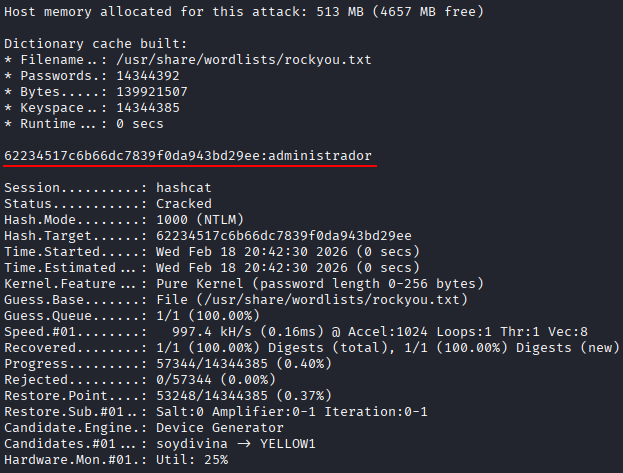
Admin hashed password is 62234517c6b66dc7839f0da943bd29ee. So we can try to crack it using hashcat as follows:
echo 62234517c6b66dc7839f0da943bd29ee > hash.txt
hashcat -m 1000 -a 0 hash.txt /usr/share/wordlists/rockyou.txt
After cracking the password, the password for admin is administrador
External Connections
Determine how many connections to external IP addresses were established at the time of the memory capture.
vol -f dump.raw -r csv windows.netscan
TreeDepth |
Offset |
Proto |
LocalAddr |
LocalPort |
ForeignAddr |
ForeignPort |
State |
PID |
Owner |
Created |
|---|---|---|---|---|---|---|---|---|---|---|
0 |
0x7dc00cf0 |
TCPv4 |
192.168.170.131 |
49167 |
157.157.19.106 |
80 |
CLOSE_WAIT |
816 |
iexplore.exe |
N/A |
0 |
0x7dc50170 |
TCPv4 |
192.168.170.131 |
49169 |
52.142.114.2 |
80 |
CLOSE_WAIT |
816 |
iexplore.exe |
N/A |
0 |
0x7dc53890 |
TCPv4 |
192.168.170.131 |
49173 |
204.79.197.200 |
443 |
CLOSE_WAIT |
816 |
iexplore.exe |
N/A |
0 |
0x7dc5f010 |
TCPv4 |
192.168.170.131 |
49172 |
185.63.145.5 |
80 |
CLOSE_WAIT |
816 |
iexplore.exe |
N/A |
0 |
0x7dc64010 |
TCPv4 |
192.168.170.131 |
49175 |
18.196.179.110 |
443 |
CLOSE_WAIT |
816 |
iexplore.exe |
N/A |
0 |
0x7dc6c450 |
TCPv4 |
127.0.0.1 |
58029 |
127.0.0.1 |
58028 |
ESTABLISHED |
3084 |
firefox.exe |
N/A |
0 |
0x7dc9f010 |
TCPv4 |
192.168.170.131 |
49188 |
40.77.226.250 |
443 |
CLOSE_WAIT |
816 |
iexplore.exe |
N/A |
0 |
0x7dcaacf0 |
TCPv4 |
192.168.170.131 |
59656 |
54.192.86.81 |
443 |
ESTABLISHED |
3692 |
firefox.exe |
N/A |
0 |
0x7dcb4890 |
TCPv4 |
192.168.170.131 |
49202 |
40.77.226.250 |
443 |
CLOSE_WAIT |
816 |
iexplore.exe |
N/A |
0 |
0x7dcc5550 |
TCPv4 |
127.0.0.1 |
58022 |
127.0.0.1 |
58021 |
ESTABLISHED |
3312 |
firefox.exe |
N/A |
0 |
0x7dccabe0 |
TCPv4 |
192.168.170.131 |
49184 |
152.199.22.24 |
443 |
CLOSE_WAIT |
816 |
iexplore.exe |
N/A |
0 |
0x7dcd7010 |
TCPv4 |
192.168.170.131 |
49196 |
172.217.20.110 |
80 |
CLOSE_WAIT |
816 |
iexplore.exe |
N/A |
0 |
0x7dce1010 |
TCPv4 |
192.168.170.131 |
49191 |
40.77.226.250 |
443 |
CLOSE_WAIT |
816 |
iexplore.exe |
N/A |
0 |
0x7dceb7a0 |
TCPv4 |
192.168.170.131 |
49206 |
40.77.226.250 |
443 |
CLOSE_WAIT |
816 |
iexplore.exe |
N/A |
0 |
0x7dcf18e0 |
TCPv4 |
192.168.170.131 |
49205 |
52.142.114.2 |
443 |
CLOSE_WAIT |
816 |
iexplore.exe |
N/A |
0 |
0x7dcfd3f0 |
TCPv4 |
192.168.170.131 |
49204 |
204.79.197.200 |
443 |
CLOSE_WAIT |
816 |
iexplore.exe |
N/A |
0 |
0x7dd17340 |
TCPv4 |
192.168.170.131 |
49198 |
204.79.197.200 |
443 |
CLOSE_WAIT |
816 |
iexplore.exe |
N/A |
0 |
0x7dd1da40 |
TCPv4 |
192.168.170.131 |
49197 |
104.81.141.250 |
443 |
CLOSE_WAIT |
816 |
iexplore.exe |
N/A |
0 |
0x7dd25010 |
TCPv4 |
192.168.170.131 |
49200 |
104.99.232.27 |
443 |
CLOSE_WAIT |
816 |
iexplore.exe |
N/A |
0 |
0x7dd899c0 |
UDPv4 |
0.0.0.0 |
0 |
* |
0 |
3692 |
firefox.exe |
2020-06-12 16:16:17.000000 UTC |
|
0 |
0x7dd8f730 |
TCPv4 |
- |
58024 |
13.227.209.7 |
443 |
CLOSED |
3692 |
firefox.exe |
- |
0 |
0x7dddc270 |
TCPv4 |
127.0.0.1 |
58016 |
127.0.0.1 |
58017 |
ESTABLISHED |
3976 |
firefox.exe |
N/A |
0 |
0x7ddef670 |
TCPv4 |
127.0.0.1 |
58015 |
127.0.0.1 |
58014 |
ESTABLISHED |
3692 |
firefox.exe |
N/A |
0 |
0x7ddf2600 |
TCPv4 |
127.0.0.1 |
58039 |
127.0.0.1 |
58040 |
ESTABLISHED |
2784 |
firefox.exe |
N/A |
0 |
0x7de243c0 |
UDPv4 |
0.0.0.0 |
5355 |
* |
0 |
604 |
svchost.exe |
2020-06-12 16:15:20.000000 UTC |
|
0 |
0x7de78190 |
TCPv4 |
192.168.170.131 |
139 |
0.0.0.0 |
0 |
LISTENING |
4 |
System |
- |
0 |
0x7de80510 |
TCPv4 |
192.168.170.131 |
49159 |
204.79.197.200 |
80 |
CLOSED |
1032 |
iexplore.exe |
- |
0 |
0x7de85220 |
UDPv4 |
192.168.170.131 |
137 |
* |
0 |
4 |
System |
2020-06-12 16:15:17.000000 UTC |
|
0 |
0x7defd240 |
UDPv4 |
0.0.0.0 |
65116 |
* |
0 |
604 |
svchost.exe |
2020-06-12 16:18:30.000000 UTC |
|
0 |
0x7df4ca50 |
TCPv4 |
127.0.0.1 |
58017 |
127.0.0.1 |
58016 |
ESTABLISHED |
3976 |
firefox.exe |
N/A |
0 |
0x7df62cf0 |
TCPv4 |
192.168.170.131 |
49158 |
204.79.197.203 |
80 |
CLOSE_WAIT |
816 |
iexplore.exe |
N/A |
0 |
0x7df6d600 |
UDPv4 |
127.0.0.1 |
60152 |
* |
0 |
816 |
iexplore.exe |
2020-06-12 16:15:29.000000 UTC |
|
0 |
0x7dfa9010 |
TCPv4 |
192.168.170.131 |
49157 |
184.87.56.190 |
80 |
CLOSE_WAIT |
816 |
iexplore.exe |
N/A |
0 |
0x7dfafcf0 |
UDPv4 |
127.0.0.1 |
60153 |
* |
0 |
1032 |
iexplore.exe |
2020-06-12 16:15:29.000000 UTC |
|
0 |
0x7dfb8010 |
TCPv4 |
192.168.170.131 |
49160 |
157.157.19.106 |
80 |
CLOSE_WAIT |
816 |
iexplore.exe |
N/A |
0 |
0x7dfd63b0 |
UDPv4 |
0.0.0.0 |
0 |
* |
0 |
816 |
iexplore.exe |
2020-06-12 16:15:31.000000 UTC |
|
0 |
0x7dfd8010 |
TCPv4 |
192.168.170.131 |
49161 |
157.157.19.106 |
80 |
CLOSE_WAIT |
816 |
iexplore.exe |
N/A |
0 |
0x7dfda160 |
TCPv4 |
192.168.170.131 |
49166 |
192.229.221.24 |
80 |
CLOSE_WAIT |
816 |
iexplore.exe |
N/A |
0 |
0x7dfdc340 |
TCPv4 |
192.168.170.131 |
49162 |
157.157.19.106 |
80 |
CLOSE_WAIT |
816 |
iexplore.exe |
N/A |
0 |
0x7dfdd7f0 |
TCPv4 |
192.168.170.131 |
49163 |
157.157.19.106 |
80 |
CLOSE_WAIT |
816 |
iexplore.exe |
N/A |
0 |
0x7dfe2770 |
TCPv4 |
192.168.170.131 |
49164 |
157.157.19.106 |
80 |
CLOSE_WAIT |
816 |
iexplore.exe |
N/A |
0 |
0x7e05acf0 |
TCPv4 |
127.0.0.1 |
58040 |
127.0.0.1 |
58039 |
ESTABLISHED |
2784 |
firefox.exe |
N/A |
0 |
0x7e0dccf0 |
TCPv4 |
0.0.0.0 |
49156 |
0.0.0.0 |
0 |
LISTENING |
528 |
lsass.exe |
- |
0 |
0x7e16c9e0 |
TCPv4 |
192.168.170.131 |
59658 |
54.192.86.49 |
443 |
ESTABLISHED |
3692 |
firefox.exe |
N/A |
0 |
0x7e194900 |
TCPv4 |
127.0.0.1 |
58028 |
127.0.0.1 |
58029 |
ESTABLISHED |
3084 |
firefox.exe |
N/A |
0 |
0x7e208640 |
TCPv4 |
0.0.0.0 |
49152 |
0.0.0.0 |
0 |
LISTENING |
412 |
wininit.exe |
- |
0 |
0x7e20bcf0 |
TCPv4 |
0.0.0.0 |
49152 |
0.0.0.0 |
0 |
LISTENING |
412 |
wininit.exe |
- |
0 |
0x7e20bcf0 |
TCPv6 |
:: |
49152 |
:: |
0 |
LISTENING |
412 |
wininit.exe |
- |
0 |
0x7e336520 |
TCPv4 |
192.168.170.131 |
59657 |
54.192.86.49 |
443 |
ESTABLISHED |
3692 |
firefox.exe |
N/A |
0 |
0x7e33f010 |
UDPv4 |
192.168.170.131 |
138 |
* |
0 |
4 |
System |
2020-06-12 16:15:17.000000 UTC |
|
0 |
0x7e36ad70 |
UDPv4 |
0.0.0.0 |
0 |
* |
0 |
604 |
svchost.exe |
2020-06-12 16:15:17.000000 UTC |
|
0 |
0x7e36ad70 |
UDPv6 |
:: |
0 |
* |
0 |
604 |
svchost.exe |
2020-06-12 16:15:17.000000 UTC |
|
0 |
0x7e390430 |
TCPv4 |
0.0.0.0 |
49154 |
0.0.0.0 |
0 |
LISTENING |
888 |
svchost.exe |
- |
0 |
0x7e394ef0 |
TCPv4 |
0.0.0.0 |
49154 |
0.0.0.0 |
0 |
LISTENING |
888 |
svchost.exe |
- |
0 |
0x7e394ef0 |
TCPv6 |
:: |
49154 |
:: |
0 |
LISTENING |
888 |
svchost.exe |
- |
0 |
0x7e396890 |
TCPv4 |
192.168.170.131 |
49168 |
157.157.19.106 |
80 |
CLOSED |
1032 |
iexplore.exe |
- |
0 |
0x7e3a46a0 |
TCPv4 |
0.0.0.0 |
49156 |
0.0.0.0 |
0 |
LISTENING |
528 |
lsass.exe |
- |
0 |
0x7e3a46a0 |
TCPv6 |
:: |
49156 |
:: |
0 |
LISTENING |
528 |
lsass.exe |
- |
0 |
0x7e4e4ef0 |
TCPv4 |
0.0.0.0 |
49153 |
0.0.0.0 |
0 |
LISTENING |
804 |
svchost.exe |
- |
0 |
0x7e4e4ef0 |
TCPv6 |
:: |
49153 |
:: |
0 |
LISTENING |
804 |
svchost.exe |
- |
0 |
0x7e4ebc40 |
TCPv4 |
0.0.0.0 |
49153 |
0.0.0.0 |
0 |
LISTENING |
804 |
svchost.exe |
- |
0 |
0x7e56b7f0 |
TCPv4 |
192.168.170.131 |
59655 |
54.192.86.49 |
443 |
ESTABLISHED |
3692 |
firefox.exe |
N/A |
0 |
0x7e56f530 |
TCPv4 |
127.0.0.1 |
58021 |
127.0.0.1 |
58022 |
ESTABLISHED |
3312 |
firefox.exe |
N/A |
0 |
0x7e5ceba0 |
TCPv4 |
192.168.170.131 |
59651 |
35.163.188.12 |
443 |
ESTABLISHED |
3692 |
firefox.exe |
N/A |
0 |
0x7e5f8660 |
TCPv4 |
0.0.0.0 |
135 |
0.0.0.0 |
0 |
LISTENING |
728 |
svchost.exe |
- |
0 |
0x7e5f8660 |
TCPv6 |
:: |
135 |
:: |
0 |
LISTENING |
728 |
svchost.exe |
- |
0 |
0x7e5fcef0 |
TCPv4 |
0.0.0.0 |
135 |
0.0.0.0 |
0 |
LISTENING |
728 |
svchost.exe |
- |
0 |
0x7ec22cf0 |
TCPv4 |
192.168.170.131 |
49218 |
216.58.208.100 |
443 |
CLOSE_WAIT |
816 |
iexplore.exe |
N/A |
0 |
0x7ec277c0 |
UDPv4 |
0.0.0.0 |
0 |
* |
0 |
816 |
iexplore.exe |
2020-06-12 16:15:53.000000 UTC |
|
0 |
0x7ec277c0 |
UDPv6 |
:: |
0 |
* |
0 |
816 |
iexplore.exe |
2020-06-12 16:15:53.000000 UTC |
|
0 |
0x7ed78830 |
TCPv4 |
0.0.0.0 |
49155 |
0.0.0.0 |
0 |
LISTENING |
512 |
services.exe |
- |
0 |
0x7ed78830 |
TCPv6 |
:: |
49155 |
:: |
0 |
LISTENING |
512 |
services.exe |
- |
0 |
0x7ed78ae0 |
TCPv4 |
0.0.0.0 |
49155 |
0.0.0.0 |
0 |
LISTENING |
512 |
services.exe |
- |
0 |
0x7ed79390 |
TCPv4 |
0.0.0.0 |
445 |
0.0.0.0 |
0 |
LISTENING |
4 |
System |
- |
0 |
0x7ed79390 |
TCPv6 |
:: |
445 |
:: |
0 |
LISTENING |
4 |
System |
- |
0 |
0x7efc1770 |
TCPv4 |
192.168.170.131 |
49216 |
40.77.226.250 |
443 |
CLOSE_WAIT |
816 |
iexplore.exe |
N/A |
0 |
0x7f6f6cf0 |
TCPv4 |
192.168.170.131 |
49217 |
104.18.100.194 |
443 |
CLOSE_WAIT |
816 |
iexplore.exe |
N/A |
0 |
0x7fa41510 |
TCPv4 |
192.168.170.131 |
59662 |
54.192.86.50 |
443 |
ESTABLISHED |
3692 |
firefox.exe |
N/A |
0 |
0x7fa41a90 |
TCPv4 |
192.168.170.131 |
59661 |
54.192.86.49 |
443 |
ESTABLISHED |
3692 |
firefox.exe |
N/A |
0 |
0x7fa42cf0 |
TCPv4 |
192.168.170.131 |
59663 |
54.192.86.50 |
443 |
ESTABLISHED |
3692 |
firefox.exe |
N/A |
0 |
0x7fa43010 |
TCPv4 |
192.168.170.131 |
59664 |
54.192.86.50 |
443 |
ESTABLISHED |
3692 |
firefox.exe |
N/A |
0 |
0x7fa43420 |
TCPv4 |
192.168.170.131 |
59665 |
54.192.86.50 |
443 |
ESTABLISHED |
3692 |
firefox.exe |
N/A |
0 |
0x7fa43a90 |
TCPv4 |
192.168.170.131 |
59667 |
54.192.86.50 |
443 |
ESTABLISHED |
3692 |
firefox.exe |
N/A |
0 |
0x7fa448f0 |
TCPv4 |
192.168.170.131 |
59660 |
54.192.86.49 |
443 |
ESTABLISHED |
3692 |
firefox.exe |
N/A |
0 |
0x7fa45010 |
TCPv4 |
192.168.170.131 |
59659 |
54.192.86.49 |
443 |
ESTABLISHED |
3692 |
firefox.exe |
N/A |
0 |
0x7fa4b6d0 |
TCPv4 |
192.168.170.131 |
59666 |
54.192.86.50 |
443 |
ESTABLISHED |
3692 |
firefox.exe |
N/A |
0 |
0x7fa4d420 |
TCPv4 |
192.168.170.131 |
59668 |
54.192.86.50 |
443 |
ESTABLISHED |
3692 |
firefox.exe |
N/A |
0 |
0x7fa4e770 |
TCPv4 |
192.168.170.131 |
59669 |
54.192.86.50 |
443 |
ESTABLISHED |
3692 |
firefox.exe |
N/A |
0 |
0x7fe22ec0 |
UDPv4 |
0.0.0.0 |
5355 |
* |
0 |
604 |
svchost.exe |
2020-06-12 16:15:20.000000 UTC |
|
0 |
0x7fe22ec0 |
UDPv6 |
:: |
5355 |
* |
0 |
604 |
svchost.exe |
2020-06-12 16:15:20.000000 UTC |
|
0 |
0x7fe6d7c0 |
TCPv4 |
127.0.0.1 |
58014 |
127.0.0.1 |
58015 |
ESTABLISHED |
3692 |
firefox.exe |
N/A |
FILE_OBJECT Structures
How many FILE_OBJECT structures appear in memory?
vol -f dump.raw -r csv windows.filescan
TreeDepth |
Offset |
Name PDB scanning finished |
|---|---|---|
0 |
0x5dd82c0 |
\Windows\Fonts\vgafix.fon |
0 |
0x5dd8f20 |
\Windows\System32\tsddd.dll |
0 |
0x5ddff20 |
\$Directory |
0 |
0x5df0630 |
\Program Files (x86)\Mozilla Firefox\vcruntime140.dll |
0 |
0x5df0780 |
\Program Files (x86)\Mozilla Firefox\mozglue.dll |
0 |
0x5df0b30 |
\Users\Admin\AppData\Roaming\Mozilla\Firefox\Profiles\c93p7zme.default-release\storage.sqlite |
0 |
0x5df0c80 |
\Program Files\Common Files\System\wab32res.dll |
0 |
0x5df1240 |
\Users\Admin\AppData\Local\Mozilla\Firefox\Profiles\c93p7zme.default-release\cache2\entries\89DBE1DF558BB8439E2062ECC3272086F2E3FF1F |
0 |
0x5df2200 |
\Program Files (x86)\Mozilla Firefox\api-ms-win-crt-filesystem-l1-1-0.dll |
0 |
0x5df2660 |
\Program Files (x86)\Mozilla Firefox\api-ms-win-crt-time-l1-1-0.dll |
… |
… |
… |
vol -f dump.raw -r csv windows.filescan | grep '^[0-9]' | wc -l
The result is 3414
Compressed File
One of the open files is compressed using 7z. What default name does Volatility assign to it when exporting it as a .dat file?
Previouly we saw this table containing a .7z file:
TreeDepth |
Offset |
Name PDB scanning finished |
|---|---|---|
… |
… |
… |
0 |
0x7dcaa620 |
\Users\Admin\Desktop\ficheroSecreto.7z |
… |
… |
… |
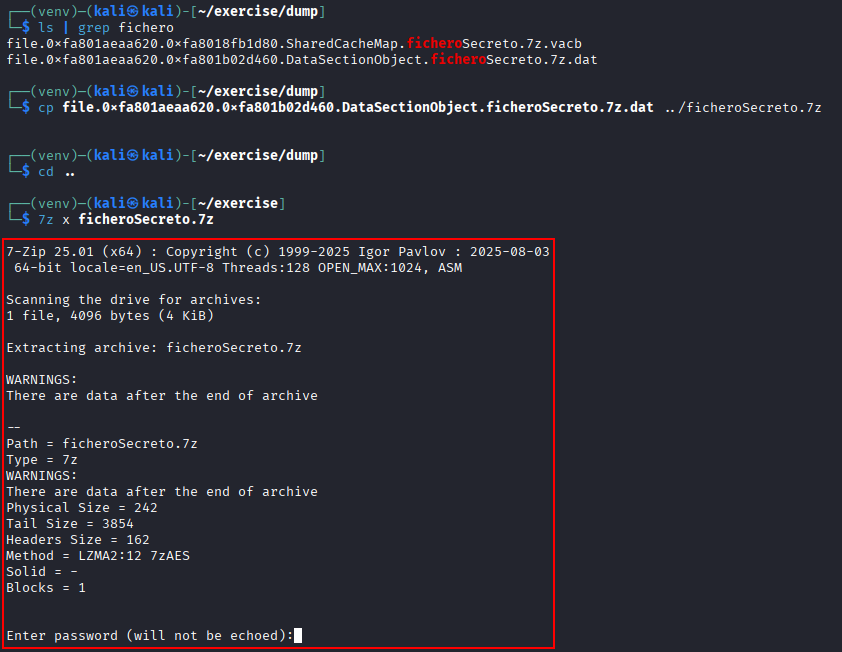
So we can try to recover it by dumping the ram content to a directory called dump:
mkdir dump
vol -f dump.raw  -o "dump" windows.dumpfile
Then, search for the extracted file and rename it with the original name. If we try to extract its content we can see that it is password protected.
ls | grep fichero
cp file.0xfa801aeaa620.0xfa801b02d460.DataSectionObject.ficheroSecreto.7z.dat ../ficheroSecreto.7z
cd ..
7z x ficheroSecreto.7z
File Path
What is the on-disk path of the compressed 7z file, as shown by the filescan plugin?
vol -f dump.raw -r csv windows.filescan | grep ficheroSecreto.7z
TreeDepth |
Offset |
Name PDB scanning finished |
|---|---|---|
0 |
0x7dcaa620 |
\Users\Admin\Desktop\ficheroSecreto.7z |
0 |
0x7e5df4d0 |
\Users\Admin\Desktop\ficheroSecreto.7z.tmp |
File Creation Date
When was the compressed file created? Expected format: DD/MM/YYYY
vol -f dump.raw -r csv windows.mftscan.MFTScan | grep ficheroSecreto.7z
TreeDepth |
Offset |
Record Type |
Record Number |
Link Count |
MFT Type |
Permissions |
Attribute Type |
Created |
Modified |
Updated |
Accessed |
Filename |
|---|---|---|---|---|---|---|---|---|---|---|---|---|
1 |
0x24202120 |
FILE |
22880 |
2 |
File |
Archive |
FILE_NAME |
2020-06-12 16:17:12.000000 UTC |
2020-06-12 16:17:12.000000 UTC |
2020-06-12 16:17:12.000000 UTC |
2020-06-12 16:17:12.000000 UTC |
ficheroSecreto.7z |
1 |
0x6a9fce40 |
FILE |
22880 |
2 |
File |
Archive |
FILE_NAME |
2020-06-12 16:17:12.000000 UTC |
2020-06-12 16:17:12.000000 UTC |
2020-06-12 16:17:12.000000 UTC |
2020-06-12 16:17:12.000000 UTC |
ficheroSecreto.7z.tmp |
It was created on 12 June 2020 at 16:17:12 (UTC).
Visited Website
Find the address of a science-related website visited using Firefox. Expected format: https://xxxxxxx.xx
strings -a dump.raw | grep -E "https://[a-zA-Z0-9\-]{7}\.[a-z]{2}"
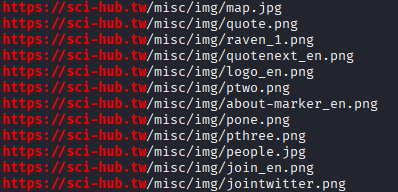
The page is https://sci-hub.tw
Date and Time of Visit
When was the website mentioned in the previous question visited?
Expected format: `DD/MM/YYYY HH:MM:SS (UTC)`
Go to the directory dumped in exercise 10 and search for the places.sqlite file where firefox stores some cache information.
cd dump
ls -lah | grep places.sqlite
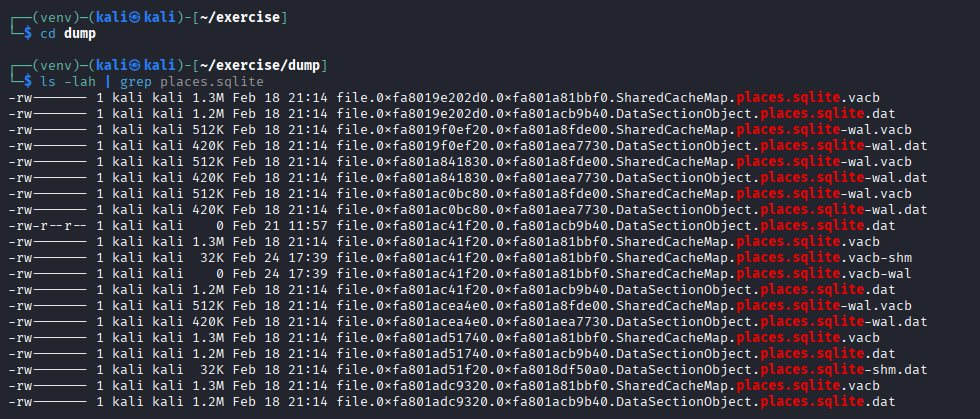
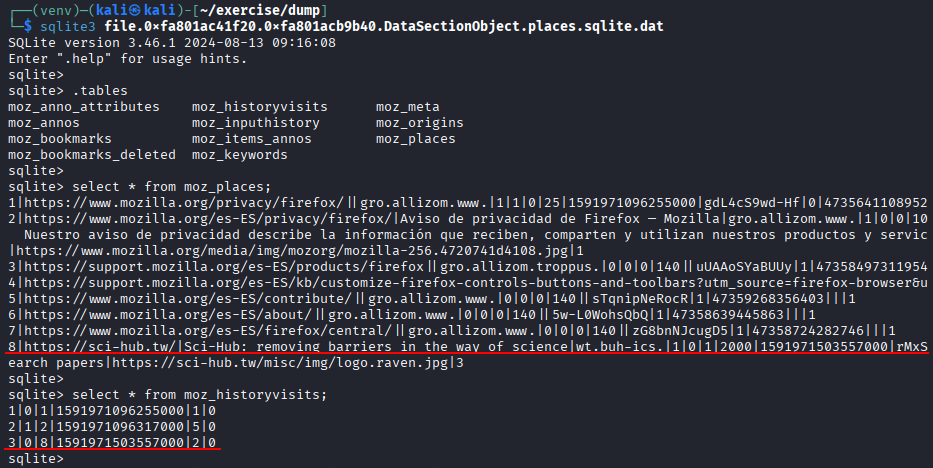
Open one big file and open moz_places and moz_historyvisits, trying to obtain the ID of the request (in this case 8) and the timestamp
sqlite3 file.0xfa801ac41f20.0xfa801acb9b40.DataSectionObject.places.sqlite.dat
.tables
select * from moz_places;
select * from moz_historyvisits;
Transform the date to a human redeable time format:
select datetime(1591971503557000/1000000,'unixepoch');

The date is 2020-06-12 at 14:18:23
Notepad
The Notepad application contained a password that we want to recover. Can you identify it? Hint: the user reuses part of their passwords.
Previously we saw:
TreeDepth |
PID |
PPID |
ImageFileName |
Offset(V) |
Threads |
Handles |
SessionId |
Wow64 |
CreateTime |
ExitTime |
File output |
|---|---|---|---|---|---|---|---|---|---|---|---|
… |
… |
… |
… |
… |
… |
… |
… |
… |
… |
… |
… |
0 |
3060 |
1928 |
notepad.exe |
0xfa801aa10270 |
2 |
58 |
1 |
False |
2020-06-12 16:16:34.000000 UTC |
N/A |
Disabled |
… |
… |
… |
… |
… |
… |
… |
… |
… |
… |
… |
… |
As the PID is 3060, we can dump this process specifically:
vol -f dump.raw windows.memmap --pid 3060 --dump
And then, strings the file, searching for some useful information as “columna” as the user has the operating system in spanish:
strings -e l pid.3060.dmp | less
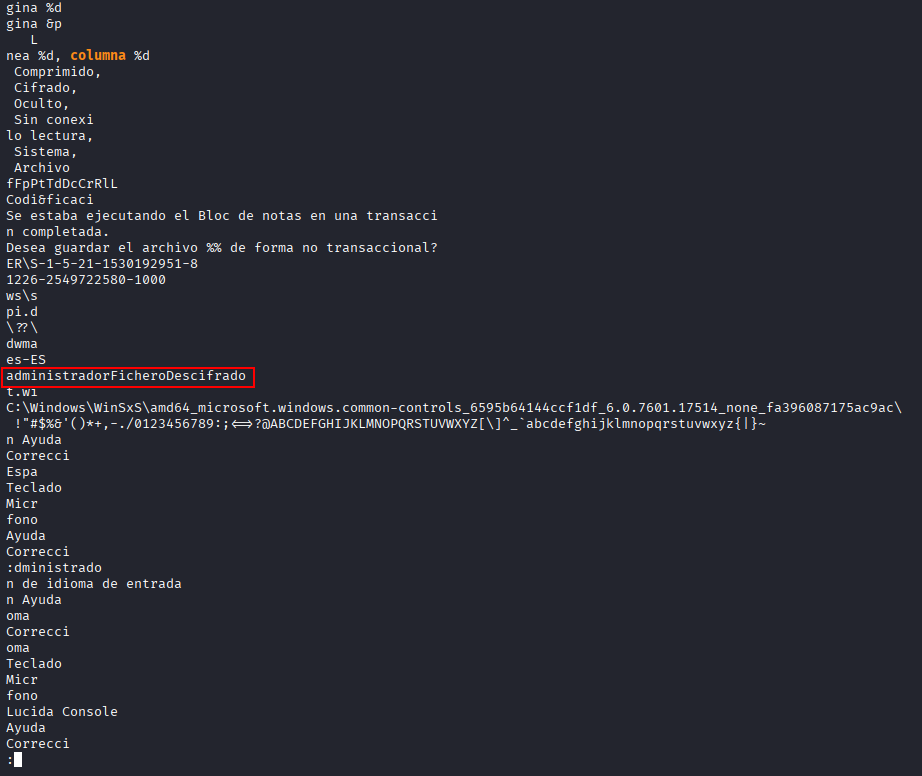
The password could be admnistradorFicheroDescifrado
Encrypted File
Analyze the contents of the compressed and encrypted 7z file. What does it contain?
Extract the content of the zip using the password admnistradorFicheroDescifrado
7z x ficheroSecreto.7z
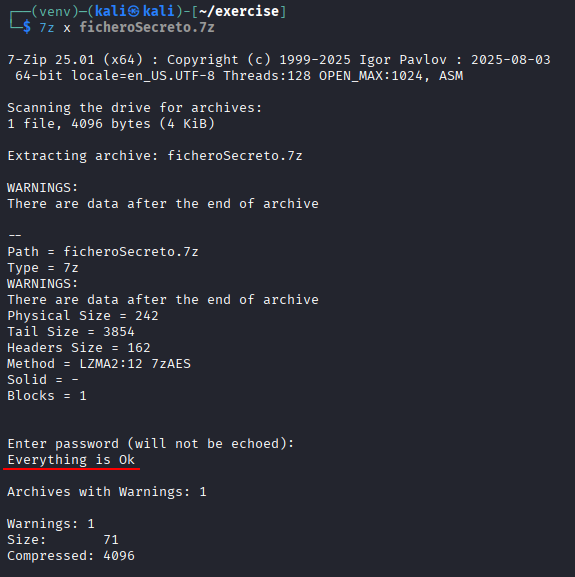
Open the file to show the flag
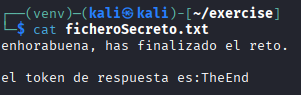
cat ficheroSecreto.txt