Memory Dump
When in our forensic practice we face a “live” operating system,
we will proceed to extract all possible evidence using a script like
the one created in practice number 1.
The next steps to take into account would be performing a memory dump and
obtaining a hard disk image. Creating the hard disk image does not present
major difficulty; we will perform a cloning procedure using the dd command,
similar to what we did in the practices of topic 2.
Regarding the memory dump, it should be noted that it is not an easy task in the
sense that there is no “standard” tool, as was the case in Windows operating systems,
that works for all Linux distributions. In most Linux scenarios, it is necessary
to compile the memory extraction tools with the exact kernel version of the machine
from which the dump is to be acquired.
Objective
Learn how to perform memory dumps in Linux using different tools.
Materials
Debian 10.9.0 64-bit distribution with kernel version 4.9.0-16-amd64
Memory extraction tools: memdump, fmem, LiME and avml. Download them from here.
You are required to create a virtual machine with the distribution mentioned above
and document, with usage examples, how the memory dump process takes place using
the tools mentioned previously.
Solution
fmem
The first tool used is fmem, which allows access to physical memory through the /dev/fmem device once the module is loaded into the kernel.
Load fmem in memory:
./fmem.sh
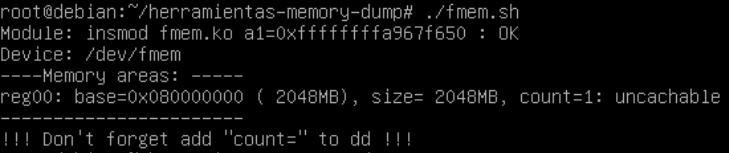
Verify that it has been loaded:
lsmod | grep fmem

Create the dump using dd and /dev/fmem as input file
dd if=/dev/fmem of=<dump-location> bs=1MB count=2048

The dump should be done. Verify it using the following command:
ls -lah /tmp/fmem-data.dd

lime
The second tool used is LiME (Linux Memory Extractor), which is a kernel module specifically designed for forensic memory acquisition.
Once the module is loaded, LiME automatically writes the memory dump to the specified location. Verify that it has been dumped using ls
insmod lime-4.19.0-16-amd64.ko "path./<dump-location> format=lime"
ls -lah

avml
The last tool used is AVML (Acquire Volatile Memory for Linux), which is one of the easiest tools to use because it does not require manual kernel compilation in many cases.
In order to dump the memory, just run:
./avml <dump-location>
This command automatically acquires the memory dump and stores it in the specified location. Then, perform an ls and verify that the memory has been dumped.
